

Removing the friction between your workforce and your data is a top priority for modern manufacturers. VKS 7.2 introduces a series of updates that transform how information is visualized on the shop floor and how expertise is managed behind the scenes.
From smarter automation to visual performance gauges, this release is built to handle the complexities of a modern manufacturing environment. We’ve updated core step logic and expanded our API capabilities to ensure that your digital work instructions are dynamic tools that drive efficiency and protect your process integrity.
Here is a look at the major milestones included in this release:
- Updated Viewer Mode & New Progress Indicators
- New Skills Management Hub
- Expert Mode Automation
- New Essential Step Logic
- New User Management Enhancements
- Streamlined Version Settings: From Interface to API
- Attachment & Image Extraction via API
Let’s dive into VKS 7.2 and discover how you can leverage its power to bridge the gap between complex data and actionable insights.
Update 1. Updated Viewer Mode & New Progress Indicators
Our first update of VKS 7.2 introduces an improved viewer interface designed to sharpen process awareness and streamline usability. This update enhances the user’s experience in two key ways:
- Improved Operator Experience
- New Progress Indicators
These new visual updates enhance how operators and supervisors interact with live production data and ensure users are aware of their step type within their work instruction.
New Progress Indicators
While VKS has always tracked performance in the top right corner of the screen, the interface now utilizes optional visual gauges to provide instant feedback on several key data points.
These indicators can be toggled on or off to ensure the interface meets the specific needs of the person at the workstation. These indicators allow users to assess their current status faster than ever before.
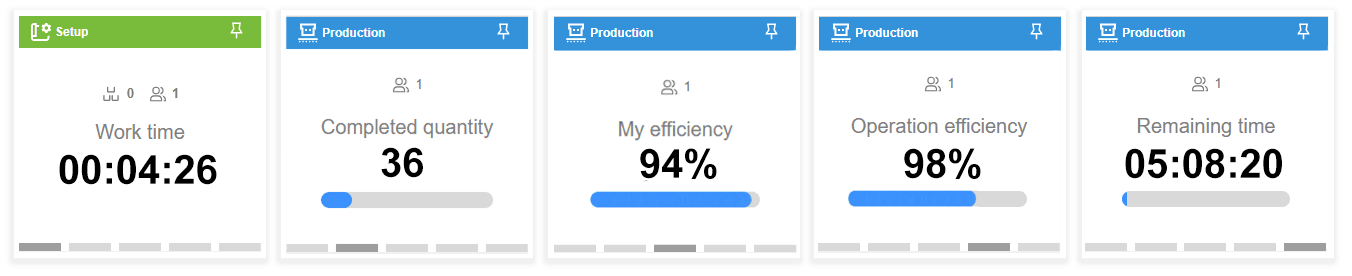
The new UI displays some new and longstanding VKS metrics:
- Completed Quantity: Displays current output relative to the total work order requirements.
- Work Time: Tracks the duration spent on the active guidebook.
- New Remaining Time: Provides a dynamic countdown based on the current pace and remaining steps.
- Operation Efficiency: Shows how the operation’s current progress compares to standard time estimates.
- My Efficiency: Shows how the individual’s progress compares to standard time estimates.
While these new visual tools streamline the experience, the legacy production metrics table is still available. Users who are not using the distraction-free view can switch back to the classic list view whenever a more granular data breakdown is required.
Mode Mastery & Awareness
VKS 7.2 introduces a refined visual interface by updating our color palette and button styling. This update aligns with current design standards while keeping the workflows you know and love exactly where they’ve always been.
Along with styling, the new interface introduces a context-aware sidebar that changes color based on the current step type. This visual cue serves as a status beacon for anyone viewing the workstation screen.
- Setup Steps: When an operator is performing machine configuration or preparation, a green banner is displayed prominently on the right side of the screen.
- Production Steps: Once the process moves into active manufacturing, the banner transitions to blue, signaling that value-added work is underway.
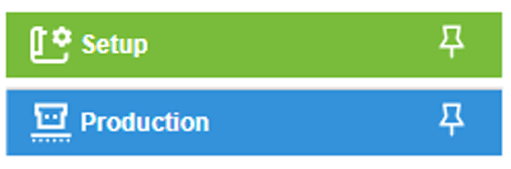
For the operator, these visual cues significantly reduce cognitive load by allowing peripheral vision to identify the current work mode instantly. Ultimately, the transition from green to blue confirms the move from preparation to active execution.

Pro Tip: Expert Mode also receives a black banner in VKS 7.2 to layer on top of Setup and Production modes. See update 3 below.
Use Case: Tools & Awareness for Success
Imagine you are tackling the final 50 units of a complex work order. With the VKS 7.2 user interface, your screen is a high-performance cockpit giving you greater process awareness and quickly presenting your efficiency and other KPIs.
The new interface ensures you stay focused on the physical assembly while maintaining total awareness of your progress through a sleek, distraction-free design.
- At-a-Glance Awareness: New visual gauges show your Completed Quantity, live Remaining Time countdown, and more. This performance tracking means you always know exactly where you stand without breaking your rhythm.
- The Competitive Edge: Your My Efficiency gauge sits at a steady 94%. This real-time feedback turns the shift into a manageable goal, allowing you to take pride in your pace. If it dips below an acceptable standard, you know to pick up the pace or flag a supervisor for help before the delay becomes a problem.
- Mode Mastery: The sidebar acts as your automated flight status. When you’re in a Setup Step, the green banner keeps you grounded and focused on preparation, ensuring your work is dialed in correctly. Once you transition to a Production Step, the banner flips to blue, signaling to hit your stride and maximize output.
By turning raw production data into simple visual cues, VKS 7.2 gives each operator on your team the scorecard they need to win the shift in real-time.
Update 2. New Skills Management Hub
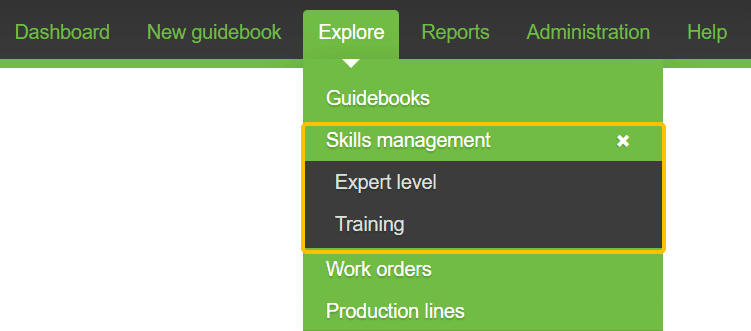
VKS 7.2 introduces our new Skills Management hub. This centralized workspace provides a unified interface for managing operator qualifications and Expert-Mode access.
Dual-Focus Management
The hub is divided into two distinct (almost identical) pages to give companies granular control over workforce capabilities:
- Expert Level Page: Supervisors use this page to manage which users can access expert mode for specific guidebooks.
- Training Page: This page tracks which workers are trained on specific guidebooks.
Pro Tip: Do you know what Expert Mode is? This VKS feature allows experienced operators to bypass non-essential steps while maintaining key process and data checkpoints.
By separating these two functions, the system distinguishes between being qualified to do a job and being authorized to use the expedited expert workflow.
Shared Tools for Better Visibility
Both management pages share a standardized functional layout to simplify navigation:
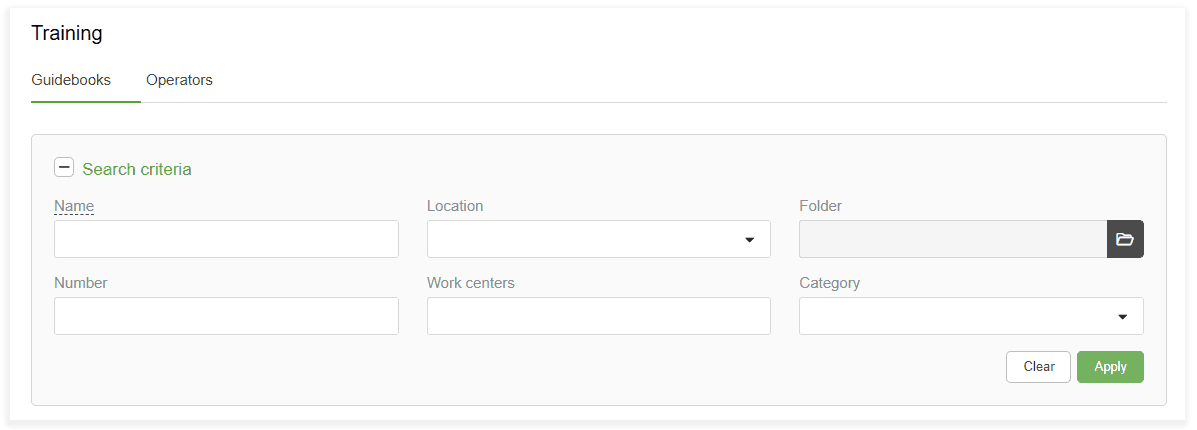
- Guidebook and Operator Tabs: Users can toggle between these views to see a list of operators qualified to use a specific guidebook or a list of guidebooks a specific operator can use. Users can also export the data from each tab.
- Flexible Search Criteria: The interface offers both compact and expanded search filters, allowing users to adjust the level of detail based on their current task.
- Search Memory: The system retains search criteria even after the page is closed, ensuring that the same filters remain active when the user returns.
- Bookmarkable URLs: Search results generate unique URLs. These can be bookmarked for quick access or shared with other team members to provide them with the exact same filtered data set.
Update 3. Expert Mode Automation
VKS 7.2 introduces a significant update to Expert Mode, designed to speed up production for experienced users. These changes focus on better visibility, easier access, and automated settings that reduce manual interaction at the start of a guidebook.
Automated Expert Mode Activation
Most notably, the system can now automatically launch a guidebook in Expert Mode.
This intelligent automation cross-references user credentials, eliminating the need for operators to manually activate expert mode and thereby streamlining the beginning of their work.
- If enabled, the system validates the operator's Expert Level status upon login. If authorized, the guidebook opens in Expert Mode immediately.
- If disabled, qualified users must manually activate the expert view after opening the guidebook.
Expert Mode Toggle
Authorized users can now use the new Expert-Mode Toggle to switch to Expert Mode. To maintain process integrity, this toggle remains inactive if the user does not have the required qualifications for that specific guidebook.

Expert Mode Banner
A new persistent banner remains visible whenever Expert Mode is active. This provides operators and supervisors with constant awareness of their current viewing mode without covering up essential guidebook instructions or workspace tools.

Update 4: New Essential Step Definitions & Logic
In conjunction with the updates of Expert-Mode, VKS 7.2 introduces a new step logic that enables Expert-Mode to function as a layer over each guidebook step.
This new logic distinguishes between step types in and out of Expert Mode to ensure process integrity.
To accurately understand this, let’s explore the new step classifications.
- Setup (S): Steps that are used in the preparation or machine configuration phase.
- Production (P): Steps that are used when active manufacturing is underway.
- New Essential Setup (S*): Crucial setup steps that remain mandatory for expert and regular users.
- New Essential Production (P*): Critical production steps (formerly Expert Steps) that remain mandatory for expert and regular users.
Layered Operational Modes
With these new step classifications, VKS 7.2 treats Expert Mode as a capability that layers on top of Setup and Production steps. This enables operators to work in combined modes:
- Setup + Expert: This allows an experienced operator to perform a first-piece setup while skipping non-essential or basic setup instructions.
- Production + Expert: This optimizes standard production for maximum speed while keeping critical steps front and center.
By allowing Expert-Mode to overlap with the other modes, companies can ensure that operators always have access to the necessary setup and production requirements.
Use Case: The Essential Expert Workflow
Imagine you are a supervisor for an assembly manufacturer under a tight deadline. For you to meet your deadline while keeping quality up, you want your veterans to move fast and your less experienced operators to have all the information they need to succeed.
In VKS 7.2, Expert Mode is a filter that knows what’s critical.
Two of your employees are working on an aerospace assembly. Sarah, a senior operator, is very familiar with this job. Bobby, a new hire, was only recently qualified for this assembly.
Thanks to the expert mode automation, Sarah and Bobby can make their work instructions fit their needs while hitting key goals for the company.
- How Bobby Uses VKS: As he follows the complete set of instructions, Bobby is guided on how to set up their workstation accordingly, how to operate certain tools, how to do visual inspections, etc., while recording serial numbers, scanning barcodes of the tools used, etc.
- How Sarah Uses VKS: In this case, Sarah is leveraging VKS mostly for product traceability and data collection. VKS automatically hides non-essential setup and production steps, like ergonomic reminders that she’s well aware of. She moves through the instructions at double speed while being guided through all complex processes and data collection procedures
The Result
Bobby, your new hire, is rapidly bringing value to the company, leveraging the work instructions to walk him through each process while collecting valuable production data.
Meanwhile, Sarah is able to breeze through the familiar process while maintaining her connection to the digital thread, guaranteeing traceability despite less interaction with the instructions.
Update 5. New User Management Enhancements
VKS 7.2 introduces updates to all user-related interfaces. These changes focus on consistent navigation and more efficient workflows for managing personnel.
This update affects 3 key aspects of User Management.
1. Modernized Interface & Intelligent Search
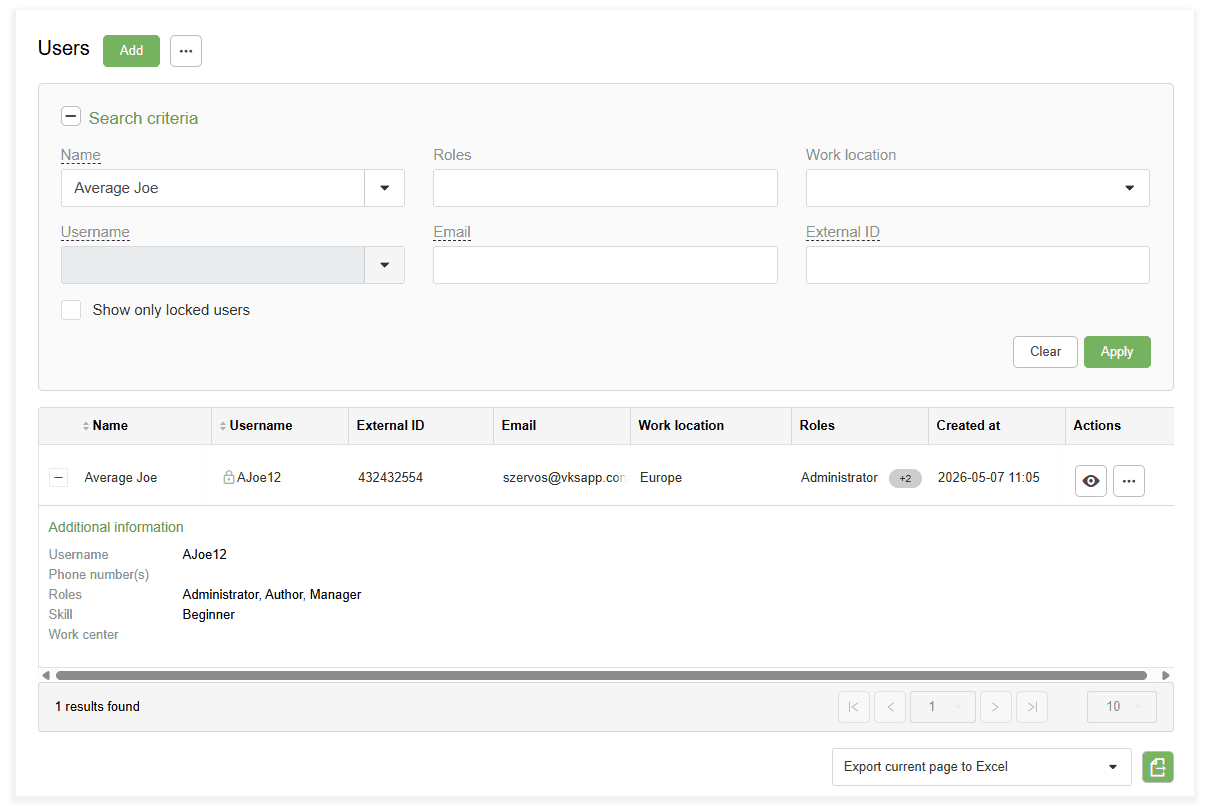
The user profiles, lists, and password management pages have been updated for better usability. These pages now include advanced search functionality to assist with workforce analysis:
- Flexible Search Views: Users can toggle between compact and expanded search criteria depending on the level of detail required for a lookup. -** Search Memory**: The system saves active search criteria in the browser. This ensures that filters remain in place even after navigating to other pages or restarting a session.
- Shareable Results: Search parameters are now captured in the URL. This allows administrators to bookmark specific filtered lists or share the exact results with other team members via a link.
2. Bulk Import & Export Users
To reduce manual data entry, VKS 7.2 includes new tools for managing large groups of users simultaneously:
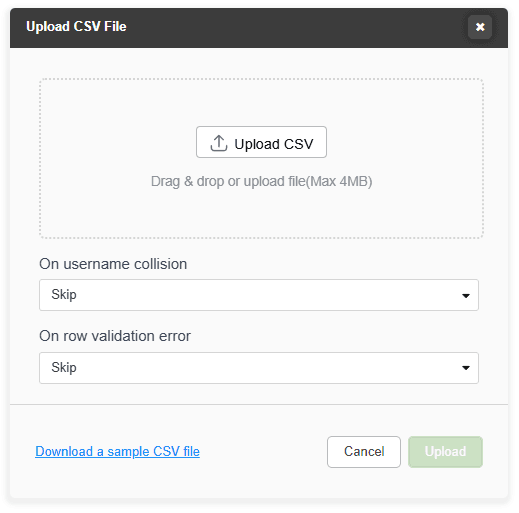
- Bulk Import: Administrators can create multiple user profiles at once by uploading a CSV file. A sample template is provided within the upload dialogue to ensure data formatting is correct.
- Data Export: User lists can be exported to Excel or CSV formats for external reporting or for auditing purposes across different systems.
These updates simplify the task of maintaining a growing workforce. By combining faster data entry tools with a more intelligent search interface, managers can spend more time focusing on operational performance.
Update 6. Improved Version Settings, from Interface to API
VKS 7.2 introduces a redesign of the Guidebook Version Settings dialogs in editor and viewer modes. This update reduces visual clutter while ensuring critical configurations are easier to locate.
Streamlined Version Settings Interface
VKS 7.2 redesigns the Version Settings dialog for both Editor and Viewer modes, reorganizing the settings within the already present three-tab structure. Accessed via the main hamburger menu (Viewer) or gear icon (Editor), the organization settings fall into three redesigned categories.
- Work Tab: Consolidates all production-related settings, such as IO configurations, default quantities, and cycle time parameters.
- Behavior Tab: Groups navigation logic and session settings, including auto-advance rules, session resume behaviors, and the new options for launching in Expert Mode.
- Appearance Tab: Contains all display-related settings, including the configuration for the new progress indicators.
These changes ensure a consistent experience across the platform, allowing administrators to configure guidebook behavior and appearance with better clarity.
Auto-Update Version Settings via API
Back in VKS 7.0, we introduced an update where modifications within your ERP or other enterprise software can automatically trigger VKS to make changes to your guidebooks.
This includes creating new guidebooks, updating revision numbers, and cloning current guidebooks.
Now in VKS 7.2, this feature has been upgraded to allow for the configuration of Version Settings during the creation or update process. This eliminates the need for manual adjustments on multiple guidebooks, saving you time when improving and creating work instructions.
- How It Works: When the ERP triggers the creation of the new VKS guidebook, the API integration automatically assigns the right settings. This can include default production quantities, specific IO configurations, auto-advance logic for the smart tools, and the correct progress indicators.
- The Benefit: Zero manual touchpoints. The work order goes from your ERP and VKS automatically creates a a fully configured, floor-ready digital work instruction instantly, ensuring 100% compliance and process settings.
By integrating these settings directly into the automated creation process, organizations can maintain consistency across their entire digital library while reducing the administrative effort required to manage individual work instructions.
Update 7. Image & Attachment Extraction via API
VKS 7.2 introduces an API update that enables automatic retrieval of files collected through digital forms. This enhancement allows teams to build comprehensive, visually supported electronic Device History Records (eDHRs) without manual data entry or file transfers.
The updated integration can now automatically extract several types of data directly from the production floor:
- Collected Photos: Images captured by operators, supervisors, or inspectors during a process are automatically pulled from the digital form.
- File Attachments: Vital documents such as PDF calibration records, CSV test logs, TXT files, and material certifications are retrieved and stored automatically.
By automating this process, any photo taken or document uploaded during a task is immediately available to your other integrated systems. This ensures that critical evidence and supporting documentation are synchronized across your tech stack in real time.
Use Case: The Audit-Ready Workflow
Imagine you are a quality manager for a medical device manufacturer. Your team is under constant pressure to maintain a 100% accurate electronic Device History Record (eDHR) within your quality management system.
Previously, every time an operator took a photo of a weld or uploaded a third-party calibration PDF, those files had to be manually transferred.
VKS 7.2 changes this.
During a critical assembly, an operator reaches a quality checkpoint. He uses his tablet to snap a photo of the finished circuit board. This photo is then automatically transferred to your preferred system.
The photo the operator took is attached to the record for that assembly, and any test logs are also filed. This process required zero manual clicks.
Your administrative team saves hours every week by ending the download-and-sync cycle.
Plus, your records are audit-ready after every process, and every file is easily found and seen; the evidence is already where it needs to be.
Driving Efficiency and Connected Intelligence
VKS 7.2 bridges the gap between complex data and actionable insights on the shop floor. From intuitive visual cues, automating expert mode, streamlined user experience, and more, this release empowers every worker, from the frontline workers and team leads to managers and executives.
This latest update ensures your entire digital thread remains automated, scalable, and audit-ready.
