

What are Digital Work Instructions?
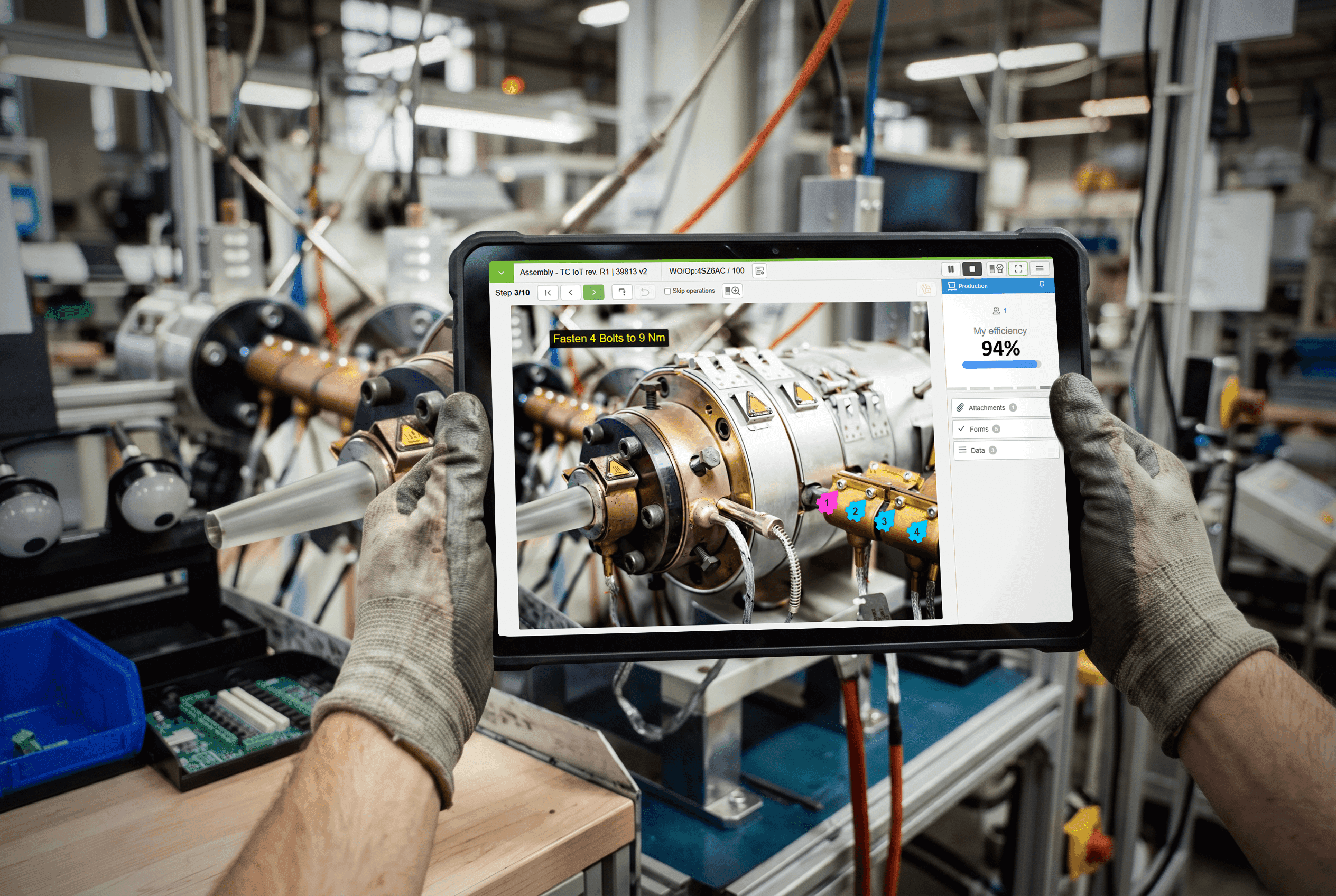
Digital work instructions are dynamic, visual, step-by-step guides that direct shop floor operators through any manufacturing process. They are a digital standardization platform that enables companies to control process standards, capture real-time shop floor data, connect with tools, and integrate with enterprise systems.
- Standardize processes
- Capture real-time shop floor data
- Connect with tools
- Integrate with enterprise systems
As the industry evolves, shop floors scale, and labor dynamics shift, the Industry needs dyanmic platfroms that allow companies to standardize and error-proof their processes inteligently, gather data reliably, and centralize their data flow across the business.
But before we dive further into what digital work instructions are, it will help to clarify what they are not:
They are not PDFs
A PDF is simply a digital printout of a paper page. It remains static and disconnected from shop floor systems.
They are not Word/Excel documents or digital folders
Digitizing text files does not optimize manufacturing nor any complex process.
When looking at the capabilities of digital work instructions, it is important to remember that if any system relies on static files, then it is not a dedicated work instruction platform.
So then, how do you choose the right software solutions within a rapidly changing industry?
This guide explores 3 important questions:
- What are digital work instructions and how do you create them?
- Why are digital work instructions needed today?
- What business value do digital work instructions bring to manufacturing?
What Powers Modern Digital Work Instructions?
Digital work instructions are centralized, purpose-built guides that replace static documents with interactive operational knowledge.
Instead of relying on static documents, which are easily damaged and difficult to update, digital work instructions take standardization to a new level with 7 core attributes.
Visual, Step-by-Step Guidance
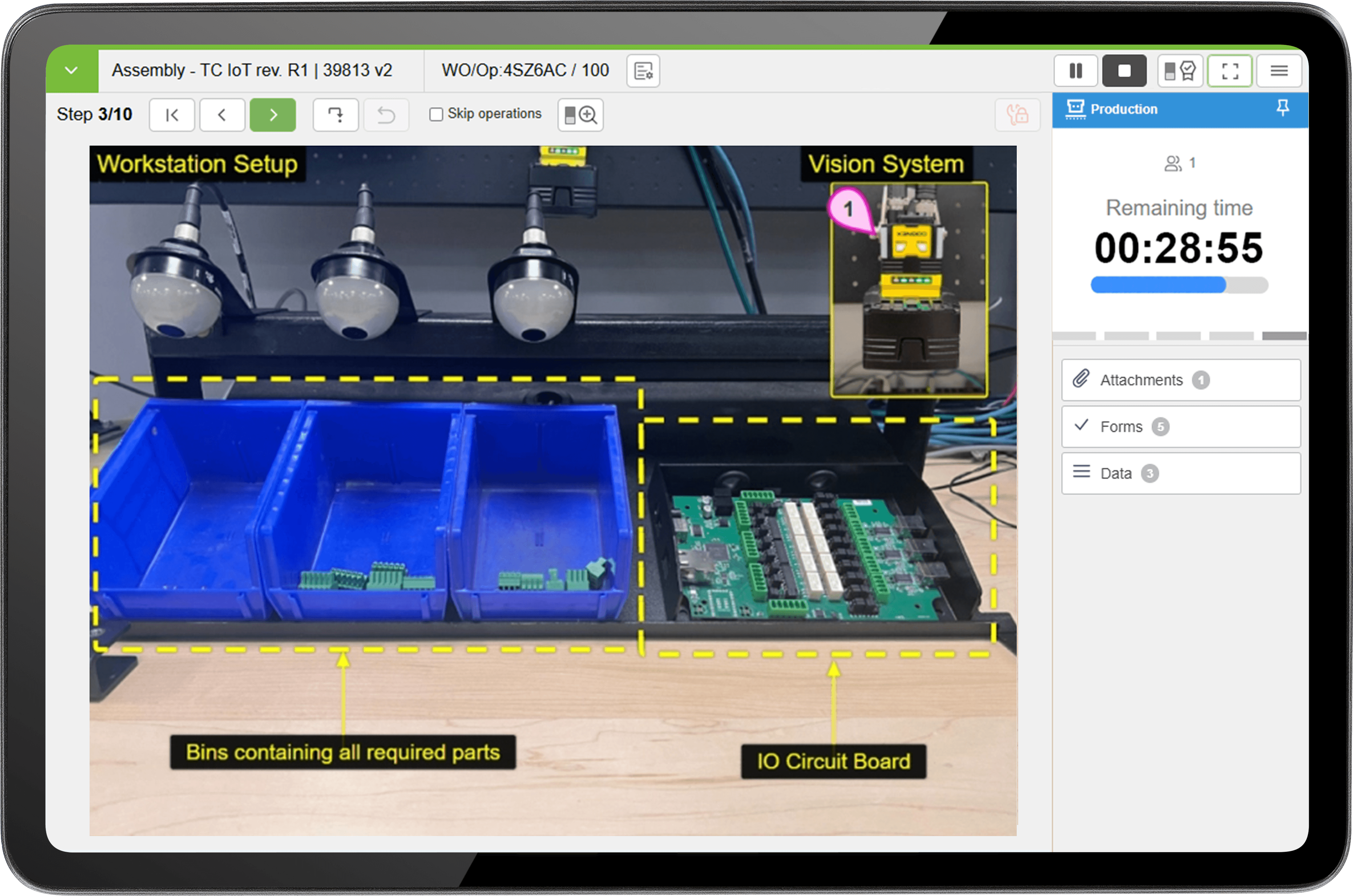
Interactive instructions with annotated images, video clips, links to CAD models, and digital forms.
No-Code Platform
Intuitive, drag-and-drop tools help process engineers build, edit, and standardize visual SOPs quickly.
Streamlined Data Collection
Smart forms and digital checklists make data collection easier. They prompt operators to log torque values, dimensions, serial numbers, or photo evidence directly at the workstation.
Version Control
Centralized cloud management that instantly pushes engineering updates to every terminal, ensuring operators only ever work from active, approved revisions.
Error-Proofing (Poka-Yoke)
Built-in verifications catch issues in real time and stop errors before parts move downstream.
Dynamic Work-Order Workflows
Automatically shows only specific steps, tools, and components required for the active product variant.
Accessibility
The most up-to-date standardized digital workflows are always available to employees on the floor.
What Documents Can Be Transformed into Digital Work Instructions?
Digital work instruction platforms allow manufacturers to transform almost any static shop floor document into an interactive, easy-to-update, and easy-to-follow workflow, including:
- Assembly Instructions
- Quality Checklists
- Reports & Analytics
- Training Manuals
- SOPs
- Audit Forms
- Product Histories
- Maintenance Procedures
Digital Work Instructions vs Paper & PDFs
| Metric / Feature | Traditional Static Instructions | Digital Work Instructions |
|---|---|---|
| Operator Guidance | Passive, text-heavy manual steps; prone to misinterpretation or skipped operations. | Interactive, step-by-step visual guidance with mandatory verification and real-time feedback. |
| Status & Versioning | Static; easily outdated; risk of missed revisions. | Real-time; cloud-synchronized; enforced version control. |
| Media Format | Text-heavy descriptions; static paper diagrams. | Visual-first; images, videos, annotations. |
| Data Collection | Manual paper logs & physical traveler tags. | Automated digital logging & smart, interactive forms. |
| Audit Compliance | High risk of paper loss or unverified signatures. | Enforced workflows & instant digital audit trails. |
How Do You Create & Use Digital Work Instructions?
You can create digital work instructions by uploading pictures and videos of a process. Then, simply add annotations, forms, alerts, and more to suit your process. Authoring digital work instructions is fast and simple.
Watch how easy it is for employees to author visual guides and follow step-by-step instructions in real time.
From automatic and manual data collection to auto-advancement, executing work instructions is intuitive and effortless. They allow workers to perform complex work without the risk of errors.
Can AI Help Create Digital Work Instructions?
Yes!
AI can significantly streamline and accelerate the creation of digital work instructions. AI-powered tools allow authors to record an expert performing a task on video. The AI will then automatically convert the raw footage into structured, step-by-step guides. These guides will automatically have:
- Extracted visual frames
- Text descriptions
- Suggested annotations
GENERATED STEPS
- 1Place the frame on the fixture
- 2Seat the flight controller on the standoffs
- 3Tighten the mounting screws on the controller
- 4Route and secure the harness cables
This AI-driven approach shifts an author's role from manual content creation to simply reviewing and refining generated drafts. Built-in authoring settings let teams select specific output languages, adjust step granularity, and add spoken narration.
This dramatically reduces the authoring bottleneck, preserves tribal knowledge, and enables faster, standardized deployment across shop floor operations.
Why are Digital Work Instructions Needed Today?
Manufacturing operations face a combination of shifting workforce dynamics and increasing production complexity. Standardizing shop floor execution through digital work instructions addresses several pressing challenges:
Skilled Labor Shortages & High Turnover
As veteran technicians retire, companies risk losing decades of unwritten “tribal knowledge.” Digital platforms capture this expertise in visual, standardized formats. The platform allows new hires to become proficient quickly without relying on long, shadow-training periods.
Rising Product Complexity & High-Mix Production
Modern assembly lines frequently handle dozens of product variations on a single shift. Delivering dynamic, work-order-specific guidance eliminates decision fatigue. It ensures operators follow the exact steps, tools, and parts required for the active unit.
Strict Regulatory & Quality Standards
Industries such as aerospace, medical device manufacturing, and automotive face stringent audit requirements. Digital work instructions replace paper traveler sheets that are easy to lose or update late. They use automated, unchangeable digital records to prove compliance with one button press.
The Inefficiency of Static Paper & PDFs
Traditional paper binders and static PDFs are slow to update and easily damaged. They also lack an active way to catch mistakes on the line. Digital workflows sync revisions instantly and enforce active inline checks. This stops non-conformances before components move down the line.
What Challenges are Solved by Digital Work Instructions?
| Challenge | Impact of Paper & Static PDFs | Impact of Digital Work Instructions |
|---|---|---|
| Creating SOPs | Manual drafting and formatting take hours per document; static text is slow to write and difficult to clarify. | AI converts process videos into step-by-step SOPs automatically, while reusable templates speed up authoring. |
| Turnover | Veteran knowledge leaves when senior workers retire. | Visual authoring tools document expert techniques into standardized, permanent guides. |
| Accessibility | Binders are easily misplaced, damaged by oils/dirt, or locked away in remote offices. | Instructions are stored in the cloud and instantly accessible on any floor device or tablet. |
| Managing Versions | Outdated paper binders remain on the floor after engineering updates. | Centralized cloud management instantly pushes revised workflows to production tablets. |
| Delays & Errors | No real-time verification; mistakes are only caught after the full unit is assembled. | Mandatory inline checks and visual cues stop errors before the unit moves down the line. |
| Real-Time Visibility | Tracking progress requires physical walk-throughs; paper audit logs are slow to index and search. | Live digital dashboards display work order progress, cycle times, and active station status in real time. |
| Delayed Data | Data logged on paper must be manually gathered and compiled. | API and IoT connections sync line data to ERP, MES, and smart tooling systems. |
Business Value & Measurable Impact on the Shop Floor
Transitioning to digital work instructions shifts process documentation from a passive compliance exercise into an active driver of manufacturing performance. By standardizing execution directly at the workstation, plant leaders measure the impact across five core operational metrics:
Business Value 1: Impacted Manufacturing KPIs
Operator Time-to-Fluency
By replacing shadow training and static manuals, factories reduce onboarding time. Workers can then reach independent production targets faster.
Built-in verification gates and step-by-step videos allow operators to learn by doing. This directly lowers the overall labor cost per training cycle. It also frees senior technicians to focus on value-add production.
We’ve been able to cut our training time in half. We went from a two-month training program to a one-month program. This has been a huge asset for our training and will continue to be a huge asset as we move forward.
First-Pass Yield (FPY) and Scrap Rates
Adding verification checks adds active error-proofing (Poka-Yoke) at each workstation. This is done through torque logs, captured images, and real-time dimensional inputs.
Catching non-conformances at the point of assembly protects material yields and eliminates offline rework loops.
Productivity & Labor Effectiveness
Delivering immediate visual setup guides and work-order-specific Bill of Materials (BOM) data reduces:
- Search friction and ambiguity
- Changeover windows
- Micro-stoppages
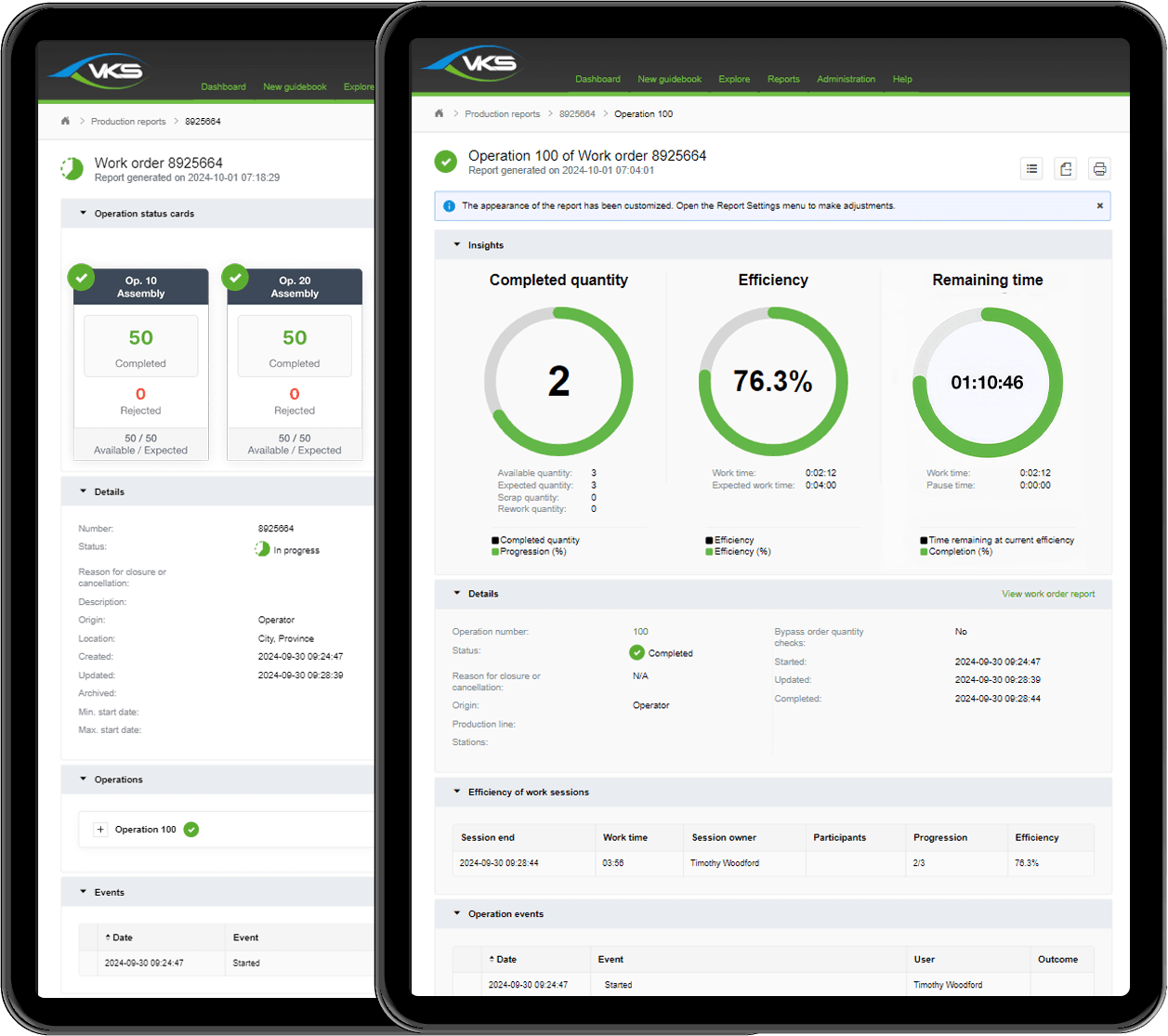
This directly impacts productivity and labor effectiveness and establishes a predictable production cadence across high-mix lines.
With VKS, we have a clear set of 20 processes for our heavy-duty unit. This cut down our production time for that particular unit by approximately 75%.
Streamlined Process Authoring
Process engineers spend significantly less time manually drafting and distributing paper revisions.
Operators can also flag errors or suggest improvements directly from their screen. This establishes an agile feedback loop between shop floor technicians and engineering teams.
Compliance Readiness & Audits
Automating shop floor data capture replaces physical traveler sheets and handwritten logbooks with 100% accurate, unalterable digital batch records.
When preparing for ISO, AS9100, or FDA audits, quality teams can quickly search and export complete serial-level execution histories. This eliminates manual archive searches and lowers compliance risks.
Business Value 2: Scalable Implementation for Any Business Size
The right work instruction platform is designed to scale dynamically alongside plant operational growth. Rather than forcing a facility-wide overhaul on day one, deployment typically follows a phased approach:
- 1
Focused Optimization
Manufacturers begin by digitizing high priority processes first to validate immediate efficiency gains and train workers.
- 2
Capability Growth
As shop floors mature, work instructions can move beyond standardization. They can leverage smart forms, IoT data collection, and automated KPI reporting.
- 3
Organizational Expansion
Standardized master templates allow verified workflows and best practices to spread seamlessly to other workstations, departments, sister facilities, and supply chain partners.
Business Value 3: Rapid Deployment
Modern digital work instruction platforms deliver rapid time-to-value. This is unlike traditional ERP or MES rollouts that require complex custom coding and extensive downtime. With digital work instructions, teams can have fully functional work instructions live within hours (or even minutes) of using the software.
Minimal Infrastructure Footprint
Web-based, responsive interfaces run natively on standard industrial tablets, touchscreen terminals, or existing PCs without specialized hardware overhead.
Flexible Cloud or On-Premises Deployment
Platforms meet strict corporate IT needs. They offer cloud-based Software-as-a-Service (SaaS) or on-premises installation. This supports air-gapped networks and defense compliance, such as ITAR.
Low Operator Learning Curves
Intuitive, tablet-friendly interfaces mirror modern consumer apps. They let shop floor staff follow visual workflows with little formal classroom training.
Business Value 4: Seamless Integration Across the Enterprise Digital Thread
Isolated software tools create data silos, forcing personnel to manually transcribe information across systems. Digital work instruction platforms utilize standardized APIs and industrial IoT protocols to connect directly to corporate infrastructure:
Enterprise System Connectivity (ERP / MES / PLM)
Automated bidirectional synchronization pulls live work order details, BOM changes, and routing sequences directly to the operator. At the same time, it automatically pushes completed job statuses and material consumption back to executive systems.
Smart Tool & Hardware Integration
Direct communication with IoT devices, including digital torque wrenches, weight scales, calipers, and vision inspection equipment. This integration enforces parameter limits automatically, ensuring tools execute within spec before allowing the worker to advance.
Connecting work instructions to the broader digital thread eliminates double data entry. It reduces administrative load and ensures execution data remains synchronized across every manufacturing layer.
Explore Digital Work Instructions within Your Industry
Digital work instructions replace static, error-prone documents with an active, connected operational hub. By pairing AI-accelerated authoring with error-proofed visual guidance, manufacturers preserve tribal knowledge, shorten onboarding, and catch defects in real time while syncing execution data across smart tools and enterprise systems.
Discover exactly how VKS digital work instructions can be tailored to meet the specific manufacturing needs of your industry.